Pages

Showing posts with label iOS. Show all posts

Monday, 23 February 2015

Using Hopscotch to Create Story Animations

I have been spending a huge amount of time with Hopscotch on the iPad in the last few days. It would seem that an obsession is growing...

As you can see from some of my earlier posts, I do like to play around with Scratch to create fun little games and projects, and if I'm honest, I hadn't really used Hopscotch much since hearing about it a couple of years ago now. Then I saw a link to one of their YouTube videos:


After watching it, I immediately wanted to give it a try! With my Scratch experience safely tucked under my belt, I ventured into the wonderful world of Hopscotch!

So obsessed am I, that I have created three YouTube videos so far! Each one has progressively become more and more elaborate. 'The Magic Minecraft Pencil' even became a full animation piece. Here are my three videos in a playlist:


This really is a great app, and perfectly introduces children of primary age to coding. It is very easy to create something, and that something may be a simple animation or even a hugely complex game. I would aim this app at children in key stage 2 as there are other apps like Scratch Jr and Kodable that I would give to key stage 1 and Early Years first. That's not to say Hopscotch couldn't be used at all in those phases, of course!

I always like to look for cross curricular links in all of my teaching, and creating animations in Hopscotch could very easily support children in the writing of short stories or even non-fiction writing (instructions perhaps!) Children could either create the Hopscotch story scene first and use that as a stimulus to write their story. Or, they couldn't create the story first and then try to bring it to life in Hopscotch.

Happy Hopscotching!

Monday, 9 February 2015

Safer Internet Day 2015

As it's Safer Internet Day tomorrow, here's a great idea to help young children understand their responsibility to be respectful online.

Childnet have published a great little story about a duck called Digiduck which I have read to my Year 2 children (link to the online story by clicking on the front cover below). Now that the children know the story, I have reduced it to the main events and imported those pages into one of my favourite apps, Book Creator.

Tomorrow, I'll be asking the children to add whatever multimedia they like to the book - sound clips, videos, etc. This will allow them to comment on the story as it progresses!

I have created an example to show the children and you can download it here! There are lots of hidden sound clips so try tapping on a couple of characters faces to see what happens.

My favourite part of the eBook is the final page, where there are 4 key questions to check the children's understanding. Here the children will record their responses in video or sound clips again!

I will be using some of my children's stories to collate a school Internet Safety eBook. I've asked all the teachers in my school to create a year group 'chapter' each about a different aspect of eSafety. Once I have collected all the chapters, I'll combine them all into a great book!

I'm looking forward to tomorrow!

Sunday, 8 February 2015

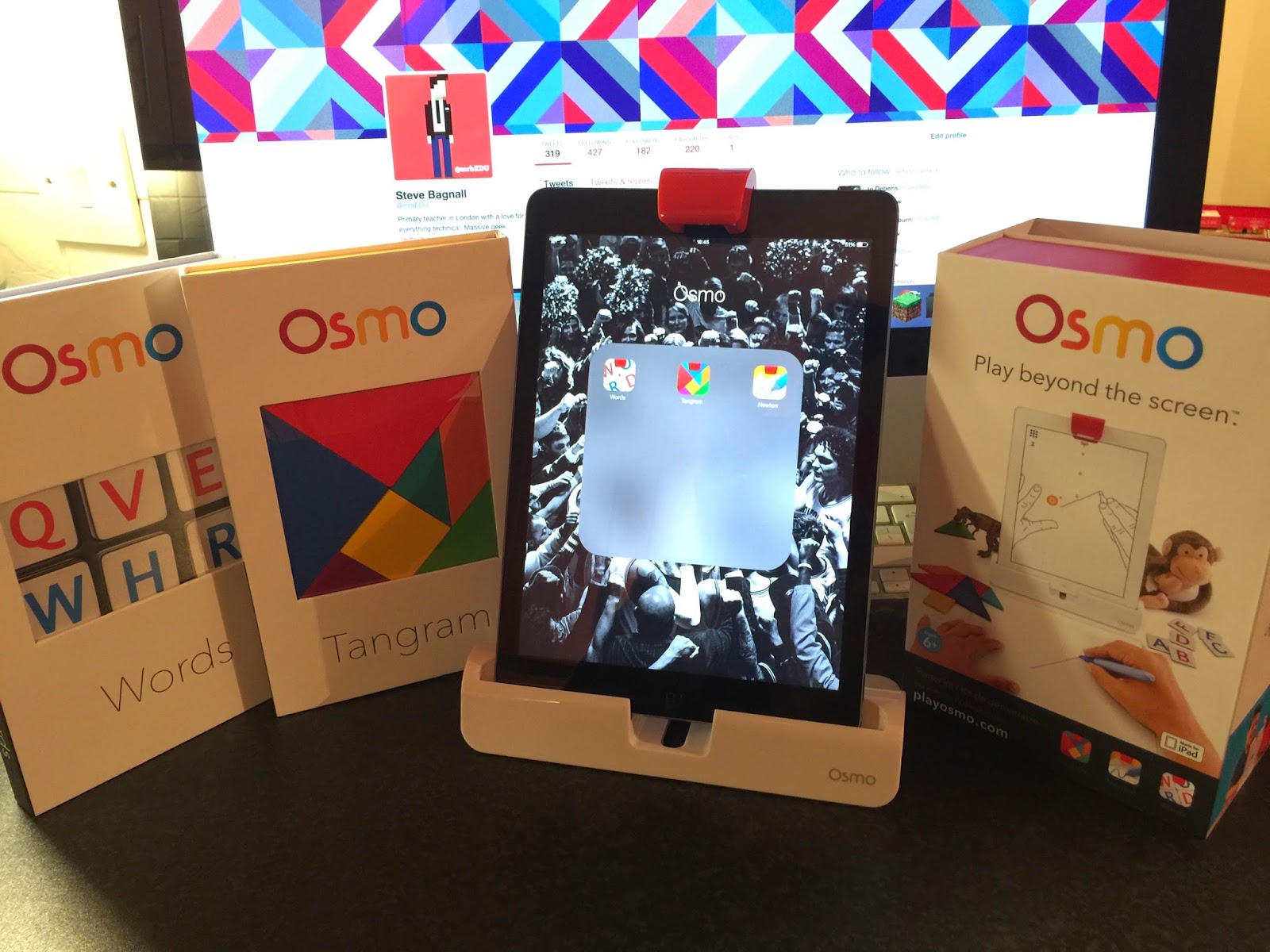
The Osmo Game System

With the help of Mr. P and has amazing ICT Blog (go check it out!), I discovered a great little toy recently - The Osmo!
www.playosmo.com
If nothing else, I'll be getting a lot of hours of fun out of it myself... However, I really like it as a simple tool to engage children in solving puzzles through the use of critical thinking skills.

On the box, the Osmo suggests it is a 'unique gaming accessory for the iPad that comes with games that will change the way your child plays'. Indeed... Quite a bold statement! But the Osmo really is pretty special. Let's see how it works!

The first thing out of the box is the base and reflector. Your iPad sits in the base and the reflector slips over the front facing camera, which contains a mirror in order to allow the iPad to "see" in front of it - clever!

iPad with base and reflector attached
The Osmo currently comes with three games - Tangram, Newton and Words. All three apps can be download for free from the App Store, but the hardware is needed to play, of course!

This is a physics game that will feel fairly familiar, in which you have to make the falling balls land on targeted zone by putting any object on the 'playing field'. The objects that you place can literally be anything - a pen, a set of keys, your own hand! You can also place a piece of A4 paper in front of the iPad and draw lines on the page...


Newton
Tangram is a lot of fun! You need to arrange the physical tan pieces to match the on-screen shape. You can start off with a simple puzzle where you are told which shape goes in which position, and quickly progress to the real challenge of having a complete silhouette with no guidance at all. I could see this being very popular in a classroom and having the iPad there to interact with will make it so much more engaging!

Tangram
The last game in the set is Words and, as with all three, it is a familiar game played in a more engaging digital way. This is the Osmo's take on Hangman. Words is a two player/team game with each side having their own complete alphabet on small tiles. A picture clue will appear on the screen and both players have to frantically work out what the word in and then fling the correct letters in front of the iPad. Obvious links to consolidating phonics skills here, as well as developing those all important critical thinking skills too.

Words
Ultimately, I really like the Osmo. It has rejuvenated some classic games/puzzles and I know for a fact the kids'll dig it!


Saturday, 7 February 2015

Apps that rock my world!

It's been a long while since my last blog post and lots has happened since. So I'm going to make a very late New Year's resolution to try to make an effort to post more regularly.

Having paid a visit to the BETT Show a few weeks ago, I'm eager to share some of my favourite toys for the iPad that can be used in the classroom. I'd like to mention that I don't usually like these kind of blog posts... Too often the apps are very specific in their function and can only be used in certain lessons/situations. I have picked these apps based on their ability to be used throughout the curriculum. So, I'd like to present to you...

My Top 5 iOS Apps:
Book Creator
Book Creator
I've been using this app for a few years and the children in my class love the ability to create their very own multimedia eBooks. I often use it to allow the children to review their learning. For example; during a maths lesson on solving word problems, I asked the children to record themselves explaining the solution! I also love the ability to App Smash with Book Creator - create an image and video in another app and simply import it in!

Chatterpix
This app is a new discovery for me and I absolutely love it! It essentially allows you to turn anything into a living talking creature by taking a photograph of it and drawing a simple line mouth. Children can then record their own message. It is easy to imagine how this could be used in the classroom. I recently had some Year 2 children creating talking foods to describe their smell using similes!

YAKiT Kids
YAKiT Kids
YAKiT Kids is very similar to Chatterpix but allows you to add cartoony eyes, noses, mouths and more onto your own photographs. You can then record an audio message and watch your image come to life! What a fantastic way to create new characters and allow the children to bring them to life!

Google Classroom
Google Classroom
Google have finally released their iOS app for their fantastic Google Classroom service. I posted previously about how excited I am about this and the app has made things even more accessible. It seems to be mainly geared towards student access, rather than for teachers but it's perfectly fine by me.

ThingLink

ThingLink
Another new one to me, but again, it's easy to see the huge amount of potential there is for both students and teachers! With this app you can basically add text, web links, pictures and videos to your images. Maybe you'd like your children to label the countries within a continent? Or label the bones in the human body? This can be done in a much more interactive and creative way thanks to ThingLink.

If you have found any apps that are worth mentioning, please let me know!